• Startseite
  • E-mail
  • Geschäft
  • Files
  • Foto
  • Advertising
  • Mehr
    • E-mail
    • Geschäft
    • Files
    • Foto
    • Dating
    • Calendar
    • Games
    • Kontakte
    • Inx
    • Nachrichten
    •  
    •  

    Premium holen
DE Deutsch
  • English
  • Latviešu
  • Русский
  • Lietuvių
  • Eesti
  • Español
  • Français
  1. Startseite
  2. E-mail
  3. Pastkastes pārskats

%MESSAGE%
Pārvirzīt vēstuli

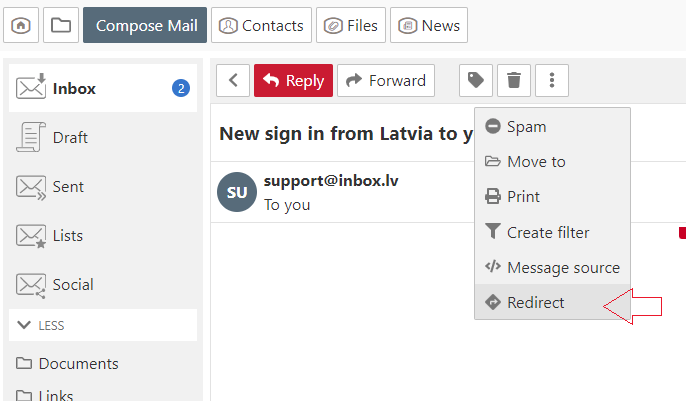
  1. Open the message,
  2. In the menu choose "More" and click "Redirect",
  3. In the new opened window in the  "To" field specify the recipient. If you want to redirect the email to multiple recipients, separate e-mail addresses with a comma,
  4. Click the "Redirect" button.


Falls Sie die Antwort nicht gefunden haben, kontaktieren Sie uns
Fragen

Kā atslēgt AdBlock programmu?
Pārvirzīt vēstuli
Vēstules saņēmējam nekorekti uzrādās vārds un uzvārds
Paziņojums par web-lapas bloķēšanu
Automātiskais atbildētājs
Visu neizlasīto vēstuļu caurskatīšana mapē
Burtu un bildes izmērs datora ekrānā
Sarakste
Vēstuļu kārtošana pastkastītē
Kā izmainīt pastkastītes statusu no “Neaktīvs”?
Atzīmēt vēstuli kā
Anmelden Einloggen

  • Inbox.lv
  • E-mail
  • Geschäft
  • Files
  • Foto
  • Dating
  • Calendar
  • Games
  • Kontakte
  • Inx
  • Amigos
  • Nachrichten
  •  
  •  

  • About Us
  • Contacts
  • Unterstützung
  • Advertising
  • Inbox.lv merchandise
  • Privacy
  • Terms of Service

Laden Sie die Apps herunter