• Inicio
  • Correo
  • Negocio
  • Archivos
  • Foto
  • Anunciando
  • Más
    • Correo
    • Negocio
    • Archivos
    • Foto
    • Citas
    • Calendario
    • Juegos
    • Contactos
    • Shortlink
    • Noticias
    •  
    •  

    Hazte Premium
ES Español
  • English
  • Latviešu
  • Русский
  • Lietuvių
  • Eesti
  • Français
  • Deutsch
  1. Inicio
  2. El correo
  3. El Buzón

%MESSAGE%
Pārvirzīt vēstuli

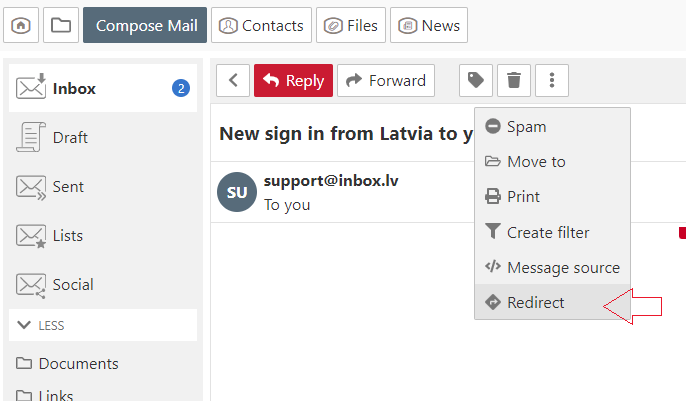
  1. Open the message,
  2. In the menu choose "More" and click "Redirect",
  3. In the new opened window in the  "To" field specify the recipient. If you want to redirect the email to multiple recipients, separate e-mail addresses with a comma,
  4. Click the "Redirect" button.


En caso de que no hayas encontrado respuesta contacta con nosotros
Preguntas

How to disable AdBlock program?
Pārvirzīt vēstuli
Vēstules saņēmējam nekorekti uzrādās vārds un uzvārds
Paziņojums par web-lapas bloķēšanu
Automātiskais atbildētājs
Visu neizlasīto vēstuļu caurskatīšana mapē
Letters and pictures size on the computer screen
Threads
Vēstuļu kārtošana pastkastītē
Kā izmainīt pastkastītes statusu no “Neaktīvs”?
Atzīmēt vēstuli kā
Inscribirse Entrar

  • Inbox.lv
  • Correo
  • Negocio
  • Archivos
  • Foto
  • Citas
  • Calendario
  • Juegos
  • Contactos
  • Shortlink
  • Amigos
  • Noticias
  •  
  •  

  • Quiénes somos
  • Contactos
  • Apoyo técnico
  • Anunciando
  • Inbox.lv mercancía
  • Privacidad
  • Términos del Servicio

Descargar las aplicaciones